What is the best free GIF maker for PC?
ScreenToGif is the best free GIF maker for most Windows users because it records and edits in one open-source program with no watermark or paid tier. ShareX, a free open-source capture suite, is close behind, while Snagit and Easy GIF Animator are paid programs and Free GIF Maker only converts video.
| Program | Price and licence | Records the screen | Video to GIF | Editing | How to install |
|---|---|---|---|---|---|
| ScreenToGif (source) | Free, open source (MS-PL) | Yes: screen, webcam and sketch board | Yes, through FFmpeg | Frame-by-frame editor | winget NickeManarin.ScreenToGif |
| ShareX (site) | Free, open source (GPL-3.0) | Yes: Screen recording (GIF) capture | Yes: Animated GIF maker tool | No frame editor | winget ShareX.ShareX |
| Free GIF Maker by DVDVideoSoft (site) | Free, closed source | No; video-to-GIF converter only | Yes: MP4, AVI, MKV, WEBM and more | Clip start and end | Vendor installer |
| Easy GIF Animator (site) | Paid, $29.95 one-time, free trial | Not listed as a feature | Yes: video fragments to GIF | Animated GIF editor | Vendor installer |
| Snagit by TechSmith (site) | Paid, 15-day free trial | Yes: screen video capture | Yes: turns its videos into GIFs | Screenshot and video editor | Vendor installer (Windows and Mac) |
| Microsoft Store “GIF Maker” apps | Varies; some have in-app purchases | Varies by app | Varies by app | Varies by app | Microsoft Store |
Read from each project's own site and, for ScreenToGif and ShareX, from GitHub and the winget repository on September 29, 2026.
The download results for this search mix Microsoft Store listings, download portals and vendor pages, so it helps to know which kind of program you are getting. Web tools such as Ezgif need no download at all, but they upload your video to a server and cannot record your screen.
How do I download a free GIF maker for PC?
The quickest way to download a free GIF maker on Windows is to install ScreenToGif with winget from the Run box, which takes four actions and fetches the official file from GitHub.
- Copy the install command. Copy the winget command for ScreenToGif from the install box.
- Open the Run box. Press Win+R on the keyboard.
- Paste and run. Press Ctrl+V, then Enter; winget downloads the official setup MSI from GitHub and installs it.
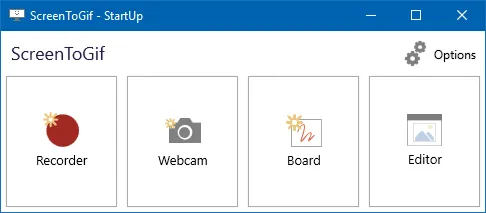
- Open the GIF maker. Start ScreenToGif from the Start menu and choose Recorder to capture the screen, or Editor to load a video.
ShareX installs the same way with winget install -e --id ShareX.ShareX. Both packages live in Microsoft's community winget repository and point at the projects' own GitHub release files.
How do I make a GIF from a video on PC?
To make a GIF from a video on a Windows PC with ScreenToGif, load the video in the Editor, choose the start and end of the clip, then save it as a GIF. The labels below match the English interface of version 2.43.2.
- Open the Editor. Choose Editor in the ScreenToGif start-up window.
- Load the video. Press Ctrl + O (Load files: images, videos and projects) and pick an MP4 or other video file.
- Pick the clip. In the Import frames from video window, set Start and End, lower the Frame Rate and Scale if the GIF should be small, then confirm.
- Save the GIF. Delete frames you do not need, press Ctrl + S, choose GIF, pick an output folder and select Save.
Video import uses either FFmpeg or Windows Media Player, picked under Importer in the same window. The menu names come from the project's English interface strings and the Ctrl + O shortcut from Commands.xaml at tag 2.43.2.
When is ScreenToGif the better pick, and when is it not?
ScreenToGif is the better pick when you want a short screen recording turned into a clean GIF and need to cut, retime or annotate individual frames. Another program suits you better if you need a Mac version, an all-in-one screenshot tool, or batch video conversion.
- Choose ScreenToGif for tutorials, bug reports and product demos: the Recorder starts with F7, stops with F8, and every frame opens in the Editor.
- Choose ShareX if you already take screenshots with hotkeys and want GIF capture and automatic uploads in the same tray app.
- Choose Free GIF Maker or Easy GIF Animator if your source is a finished video file and you never record the screen.
- Choose Snagit if you need the same paid tool on Windows and Mac, with support from TechSmith.
How big is each free GIF maker download?
ScreenToGif's full setup is 71.7 MB, about half the 133 MB ShareX setup, and its Light build is 7.1 MB if .NET 9 is already installed. The sizes and SHA-256 digests below were read from each project's GitHub release data on September 29, 2026.
| Download | File | Size | SHA-256 |
|---|---|---|---|
| ScreenToGif full setup | ScreenToGif.2.43.2.Setup.x64.msi | 71.7 MB | b494e929ac250d0e09cf2803cd172cc5580d9c35df179b022b451304a06df4a7 |
| ScreenToGif Light setup | ScreenToGif.2.43.2.Light.Setup.x64.msi | 7.1 MB | 37aa0a58daeafbb068ed5039d93892399a25568610b63b7d1e6c3f007d10b8cc |
| ShareX setup | ShareX-21.0.0-setup-x64.exe | 133 MB | f213aca04d30e0e2dc7c43bc79acae8622be291cee6014a90962ed87ea5f10cc |
Sources: the ScreenToGif 2.43.2 release and the ShareX 21.0.0 release.
Frequently asked questions
What is the best free GIF maker for PC?
For recording the screen as a GIF, ScreenToGif is the strongest free choice: it is open source, has no watermark, and opens every recording in a frame editor. ShareX is the better free pick if you also want screenshots, uploads and a GIF recorder in one program.
Is there a GIF maker for PC without a watermark?
Yes. ScreenToGif and ShareX are both free, open-source programs that add no watermark to the GIFs they save, and neither has a paid tier. Check the listing of any Microsoft Store GIF maker before you install it, because features and in-app purchases vary between those apps.
Can I make a GIF from a YouTube video on my PC?
Only from a video file you are allowed to use. ScreenToGif and the other desktop GIF makers import video files from your drive, such as an MP4 you recorded or were sent; they do not download videos from YouTube or other sites.
Does ScreenToGif work on Windows 11?
Yes. The full ScreenToGif setup MSI and portable zip run on Windows 10 and 11 with the .NET runtime already included. On a Mac, ScreenToGif is not available, so Snagit or a Mac-only recorder is the alternative.